라우터의 ifXTable 데이터를 telegraf로 취득하여 influxdb에 저장해 grafana로 가시화 사는 방법
네트워크 인터페이스의 통계를 표시하는 mib
ifTable 은 counter (unsigned_int_32bit) 기반
ifXtable 은 HC counter (unsigned_int_64bit) 기반
ifHCInOctets : 네트워크 장비의 특정 포트에 지나간 바이트 수를 카운트
ifXtable http://www.net-snmp.org/docs/mibs/ifMIBObjects.html
ifTable http://www.net-snmp.org/docs/mibs/interfaces.html
yum repo 추가
yum 으로 설치
https://docs.influxdata.com/telegraf/v1.11/introduction/installation/
https://github.com/jeonghanlee/centos-mib-downloader
설정파일 위치 확인
https://docs.influxdata.com/telegraf/v1.11/introduction/getting-started/
MTRG # tree -F /etc/telegraf/
/etc/telegraf/
|-- telegraf.conf
`-- telegraf.d/

# systemctl start telegraf

# systemctl status telegraf -l
● telegraf.service - The plugin-driven server agent for reporting metrics into InfluxDB
   Loaded: loaded (/usr/lib/systemd/system/telegraf.service; enabled; vendor preset: disabled)
   Active: active (running) since Thu 2019-07-25 06:45:44 KST; 12s ago
     Docs: https://github.com/influxdata/telegraf
 Main PID: 8663 (telegraf)
   CGroup: /system.slice/telegraf.service
           └─8663 /usr/bin/telegraf -config /etc/telegraf/telegraf.conf -config-directory /etc/telegraf/telegraf.d

Jul 25 06:45:44 localhost.localdomain systemd[1]: Started The plugin-driven server agent for reporting metrics into InfluxDB.
Jul 25 06:45:44 localhost.localdomain systemd[1]: Starting The plugin-driven server agent for reporting metrics into InfluxDB...
Jul 25 06:45:45 localhost.localdomain telegraf[8663]: 2019-07-24T21:45:45Z I! Starting Telegraf 1.11.3
Jul 25 06:45:45 localhost.localdomain telegraf[8663]: 2019-07-24T21:45:45Z I! Loaded inputs: kernel mem processes swap system cpu disk diskio
Jul 25 06:45:45 localhost.localdomain telegraf[8663]: 2019-07-24T21:45:45Z I! Loaded aggregators:
Jul 25 06:45:45 localhost.localdomain telegraf[8663]: 2019-07-24T21:45:45Z I! Loaded processors:
Jul 25 06:45:45 localhost.localdomain telegraf[8663]: 2019-07-24T21:45:45Z I! Loaded outputs: influxdb
Jul 25 06:45:45 localhost.localdomain telegraf[8663]: 2019-07-24T21:45:45Z I! Tags enabled: host=localhost.localdomain
Jul 25 06:45:45 localhost.localdomain telegraf[8663]: 2019-07-24T21:45:45Z I! [agent] Config: Interval:10s, Quiet:false, Hostname:"localhost.localdomain", Flush Interval:10s
Jul 25 06:45:45 localhost.localdomain telegraf[8663]: 2019-07-24T21:45:45Z W! [outputs.influxdb] when writing to [http://localhost:8086]: database "" creation failed: Post http://localhost:8086/query: dial tcp [::1]:8086: connect: connection refused |
https://lkhill.com/telegraf-influx-grafana-network-stats/
MRTG # telegraf --test --config /etc/telegraf/telegraf.d/test.conf ... > interface,agent_host=...,dot3StatsIndex=1254621209,host=localhost.localdomain,hostname=...,ifDescr=ii26/1/26 dot3StatsAlignmentErrors=0i,dot3StatsCarrierSenseErrors=0i,dot3StatsDeferredTransmissions=0i,dot3StatsDuplexStatus=1i,dot3StatsExcessiveCollisions=0i,dot3StatsFCSErrors=0i,dot3StatsFrameTooLongs=0i,dot3StatsInternalMacReceiveErrors=0i,dot3StatsInternalMacTransmitErrors=0i,dot3StatsLateCollisions=0i,dot3StatsMultipleCollisionFrames=0i,dot3StatsSQETestErrors=0i,dot3StatsSingleCollisionFrames=0i,dot3StatsSymbolErrors=0i 1564010721000000000 ... |
라우터 설정할 때 포트의 alias나 설명을 euc-kr 인코딩으로 입력 / telegraf는 unicode나 utf-8을 처리
1) telegraf의 snmp플러그인을 수정해서 문자열을 converting
2) DB에 넣고 빼낼 때 문자열 컨버팅
MRTG # telegraf --test --config /etc/telegraf/telegraf.d/test.conf ... > interface,agent_host=...,host=localhost.localdomain,hostname=...,ifDescr=Vlan199 ifAlias="\"▒▒▒▒▒▒▒ CMI\"",ifConnectorPresent=2i,, |
43개 라우터 ifXTable 조회 2m18s
ifTable (COUNTER) / ifXTable (COUNTER64)
http://www.net-snmp.org/docs/mibs/ifMIBObjects.html
MRTG # time telegraf --test --config /etc/telegraf/telegraf.d/router-stats.conf > /tmp/test.txt 2019-07-25T02:22:49Z I! Starting Telegraf 1.11.3 real 2m18.710s user 0m1.960s sys 0m0.972s |
moderate 사양 : 초당 250K 필드 입력, 초당 25 쿼리
VM은 4코어, 32GB 램, 빠르게 비워지는 씩 프로비저닝 128GB 로 생성
https://docs.influxdata.com/influxdb/v1.7/guides/hardware_sizing/
싱글코어 256MB 램
https://community.grafana.com/t/i/2853
yum repo 추가
yum 으로 설치
https://docs.influxdata.com/influxdb/v1.7/introduction/installation/
외부에서 데이터를 넣기 위해 bind 주소 변경
DB # vi /etc/influxdb/influxdb.conf bind-address = "<공인IP>:8088" |
root 계정 생성
https://docs.influxdata.com/influxdb/v1.7/administration/authentication_and_authorization/
원격 DB 정보 설정
MRTG # vi /etc/telegraf/telegraf.conf [[outputs.influxdb]] urls = ["http://DB_IP:8086"] timeout = "5s" username = "DB_ID" password = "DB_PW" ... |
DB # influx Connected to http://localhost:8086 version 1.7.7 InfluxDB shell version: 1.7.7 > use telegraf Using database telegraf > show measurements name: measurements name ---- cpu disk diskio interface kernel mem processes swap system > select time, hostname, ifDescr, ifHCInOctets, ifHCOutOctets from interface limit 10 name: interface time hostname ifDescr ifHCInOctets ifHCOutOctets ---- -------- ------- ------------ ------------- 1564033501000000000 ........ Control Plane Interface 0 0 1564033501000000000 ........ EOBC0/0 523313485438 219027416263 1564033501000000000 ........ GigabitEthernet1/1 72976539034 13897483850 1564033501000000000 ........ GigabitEthernet1/10 0 0 1564033501000000000 ........ GigabitEthernet1/11 0 0 1564033501000000000 ........ GigabitEthernet1/12 0 0 1564033501000000000 ........ GigabitEthernet1/13 0 0 1564033501000000000 ........ GigabitEthernet1/14 0 0 1564033501000000000 ........ GigabitEthernet1/15 0 0 1564033501000000000 ........ GigabitEthernet1/16 0 0 |
DB $ influx -database telegraf -execute "show series from interface limit 5" key --- interface,agent_host=...,host=localhost.localdomain,hostname=...,ifDescr=ae0 interface,agent_host=...,host=localhost.localdomain,hostname=...,ifDescr=ae0.0 interface,agent_host=...,host=localhost.localdomain,hostname=...,ifDescr=ae1 interface,agent_host=...,host=localhost.localdomain,hostname=...,ifDescr=ae1.0 interface,agent_host=...,host=localhost.localdomain,hostname=...,ifDescr=ae2 DB $ influx -database telegraf -execute "show series from interface" | wc -l 6018 |
duration : 0s → 보관주기 무한대
the duration of the retention policy is 0s which is an alias for infinite
https://stackoverflow.com/questions/41620595
DB # influx Connected to http://localhost:8086 version 1.7.7 InfluxDB shell version: 1.7.7 > show retention policies on telegraf name duration shardGroupDuration replicaN default ---- -------- ------------------ -------- ------- autogen 0s 168h0m0s 1 true |
용량은 큰 의미가 없음
데이터를 쌓으면서 압축하는 듯
DB # date Thu Jul 25 16:49:49 KST 2019 DB # du -h -d 0 /var/lib/influxdb/data/ 63M /var/lib/influxdb/data/ |
| time | 용량 |
|---|---|
| 2019-07-25 16:49 | 63MB |
| 2019-07-26 08:35 | 56MB |
| 2019-07-26 08:57 | 77MB |
| 2019-07-29 10:39 | 428MB |
| 2019-08-05 10:45 | 858MB |
| 2019-10-15 21:39 | 4.4G |
limit 를 주어서 실행할 것
DB $ influx -database telegraf -format csv -execute "select * from interface limit 1000" > /tmp/influx.csv |
yum repo 추가
yum 으로 설치
https://grafana.com/docs/installation/rpm/
3000번 포트 방화벽 해제
최초접속
기본비밀번호 admin / admin 변경
https://grafana.com/docs/guides/getting_started/
다음문서 참고
https://lkhill.com/telegraf-influx-grafana-network-stats/
time range 설정 : 우측 상단에 있음
https://grafana.com/docs/reference/timerange/
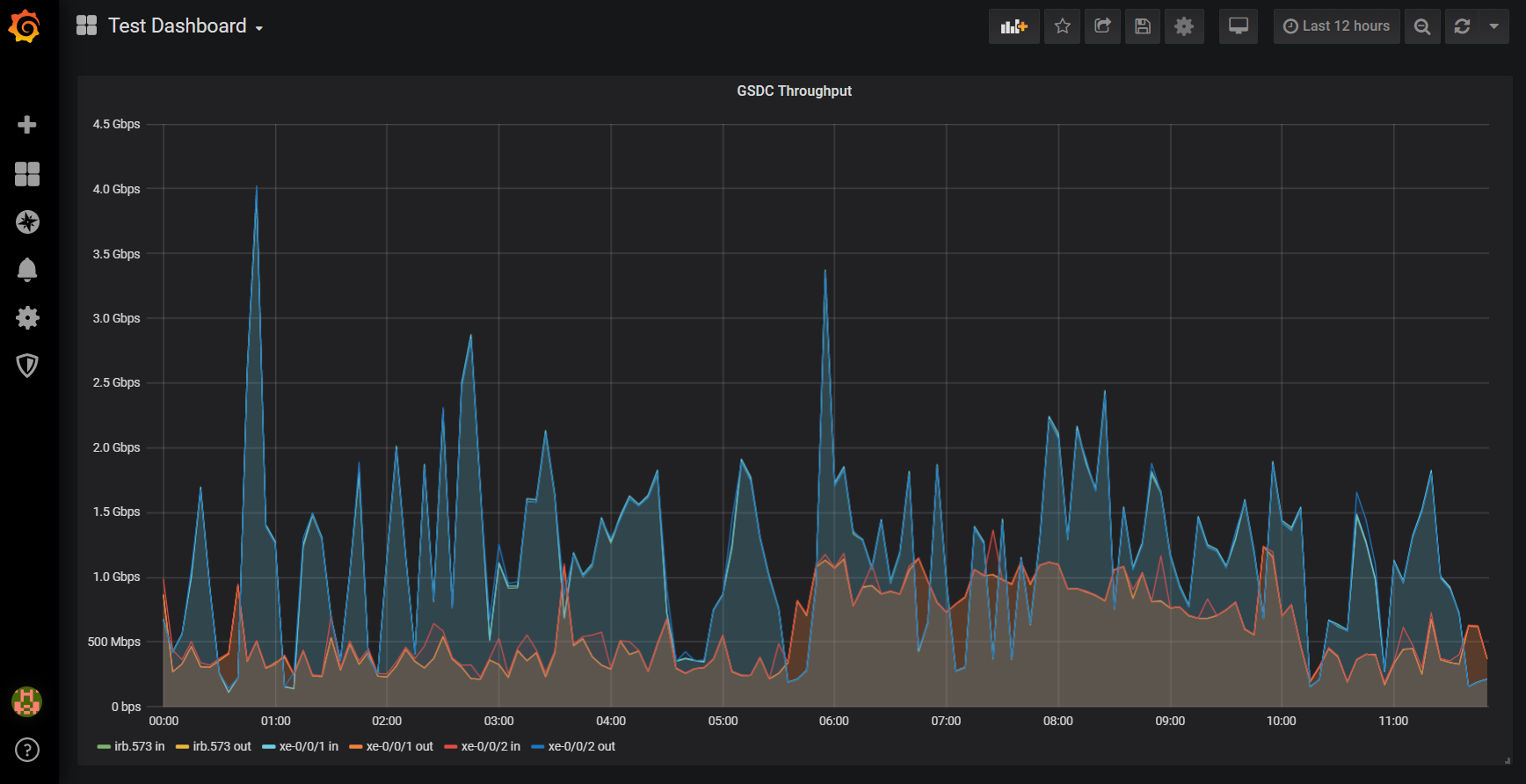
SELECT
    derivative(mean("ifHCInOctets"), 1s) *8 AS "in",
    derivative(mean("ifHCOutOctets"), 1s) *8 AS "out"
FROM "autogen"."interface"
WHERE ("hostname" = '...' AND
    (
        "ifDescr" =  'irb.573' OR
        "ifDescr" =  'irb.573' OR
        "ifDescr" = 'xe-0/0/1' OR
        "ifDescr" = 'xe-0/0/1' OR
        "ifDescr" = 'xe-0/0/2' OR
        "ifDescr" = 'xe-0/0/2'
    )
)
AND $timeFilter
GROUP BY time($__interval), "ifDescr" fill(null) |
시계열 DB 1위 : influx db
https://db-engines.com/en/ranking/time+series+dbms
influxdb 쿼리 방법
https://docs.influxdata.com/influxdb/v1.7/guides/querying_data/
telegraf 설치, snmp 테스트 (★★★★★)
https://blurblah.net/1614
https://lkhill.com/telegraf-influx-grafana-network-stats/